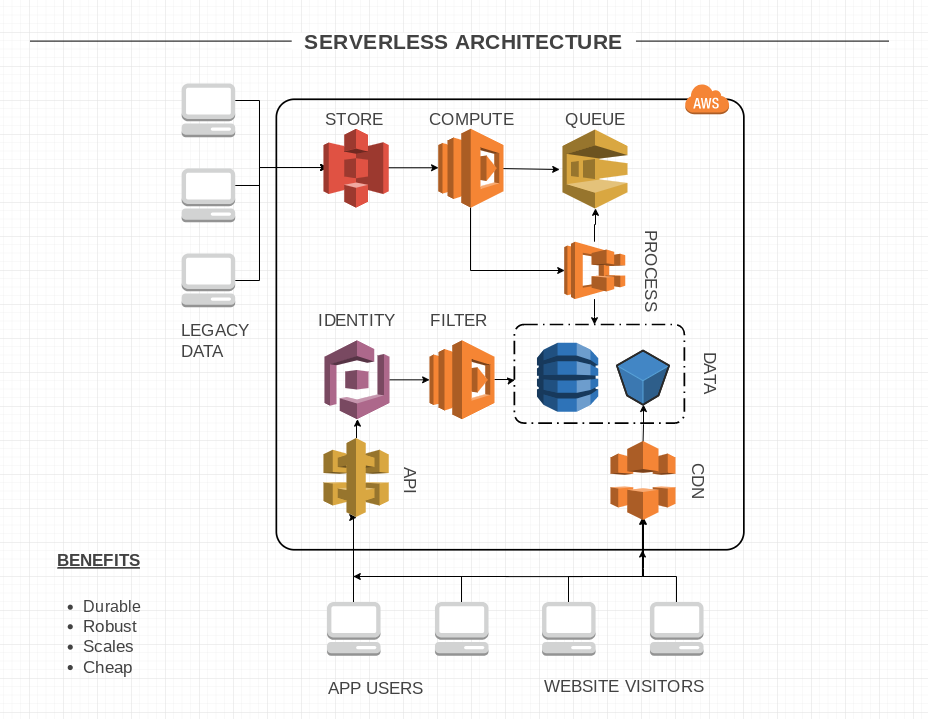
Recently we had the pleasure of implementing a serverless architecture on Amazon Web Services infrastructure to deliver a solution that is both durable & robust, while also being scalable & cost effective.
To my surprise, all this was possible even with a requirement to import and process legacy data. Using Docker containers on ECS FARGATE makes it easy to run tasks that otherwise aren't suitable for computation with Lambda, either because of it's execution time limit when processing lots of data or library and environment requirements.
For the purposes of this Business Intelligence Dashboard App, keeping the architecture serverless has several advantages:
Resilience. Using robust services that are well tested saves you from reinventing the wheel. Leveraging existing AWS services means focusing more time on your application.
Scale. The size and power of AWS means you don't ever have to worry about provisioning and migrating to larger resources as you grow without ever compromising performance.
Cost effective. Start tiny and only pay for what you use. Growing costs scale with usage and growing revenue.
Those features gave us enough confidence and reason to setup an architecture without a traditional dedicated cloud virtual machine server to power the website.
You might be able to get a jump-start on your application with scaffolding from either the
Amplify project or
AWS Mobile, but using services off-the-self is easy too if you want to power an kind of app, like ours in Vue.js. Writing
Infrastructure as Code with CI/CD tooling makes maintenance a breeze.
Using
S3,
Route 53, and
CloudFront is great for hosting your website's static assets like html, javascript, stylesheets and images. You'll be able to download them quickly, from anywhere in the world thanks to Amazon's Global CDN.
Use
API Gateway and
Lambda functions to access data from
DynanoDB and
S3 based on
Cognito user authentication.
Upload legacy data files into an S3 bucket to trigger execution of a Lambda function that adds the even to an
SQS queue and launches an
ECS Fargate task with our docker container to process the queue, importing the file data into DynamoDB and S3. There is a
nice guide available from Amazon too.
Bringing it all together also requires
IAM roles for permissions and
CloudWatch for monitoring logs of course.